
NEW Didit KYC Identity Verification is live, verify signers with government ID & biometrics for eIDAS Advanced signatures Learn more

Official addon · v1.2.0 · Listed on automatorplugin.com

When a document is signed, run the next step in WordPress.

WPsigner for Uncanny Automator adds a native WPsigner integration to the recipe builder: 18 triggers, 10 actions, and tokens for document, signer, payment, and cloud values. Recipes run on your server — no Zapier, no remote app.

Download it from the WPsigner Account Portal. WPsigner and Uncanny Automator must be active on the same site.

Recipe: Live Everyone

When

A WPsigner document is completed

Template Any template

Then

  1. Send a Slack message via WPsigner

    Signed: {{DOCUMENT_TITLE}}
    Done
  2. Enroll the user in a course

    Client onboarding
    Done
  3. Add a tag to the contact

    Contract signed
    Done
Tokens {{DOCUMENT_TITLE}}{{SIGNER_EMAIL}}{{SECURE_DOWNLOAD_URL}}{{DOCUMENT_AUDIT_URL}}
Runs on your WordPress server. No cloud relay.
18 triggers
Lifecycle, payments, backups, reminders
10 actions
Create, send, remind, tag, expire, message
Guest signers
Everyone recipes for people who are not logged in
Same site
No Uncanny cloud key, no WPsigner API relay

Official listings

Listed where WordPress teams already look

WPsigner appears in three partner directories. Each listing is maintained with the partner and points back to this site.

Inside Automator

The WPsigner integration, as it appears in the recipe builder

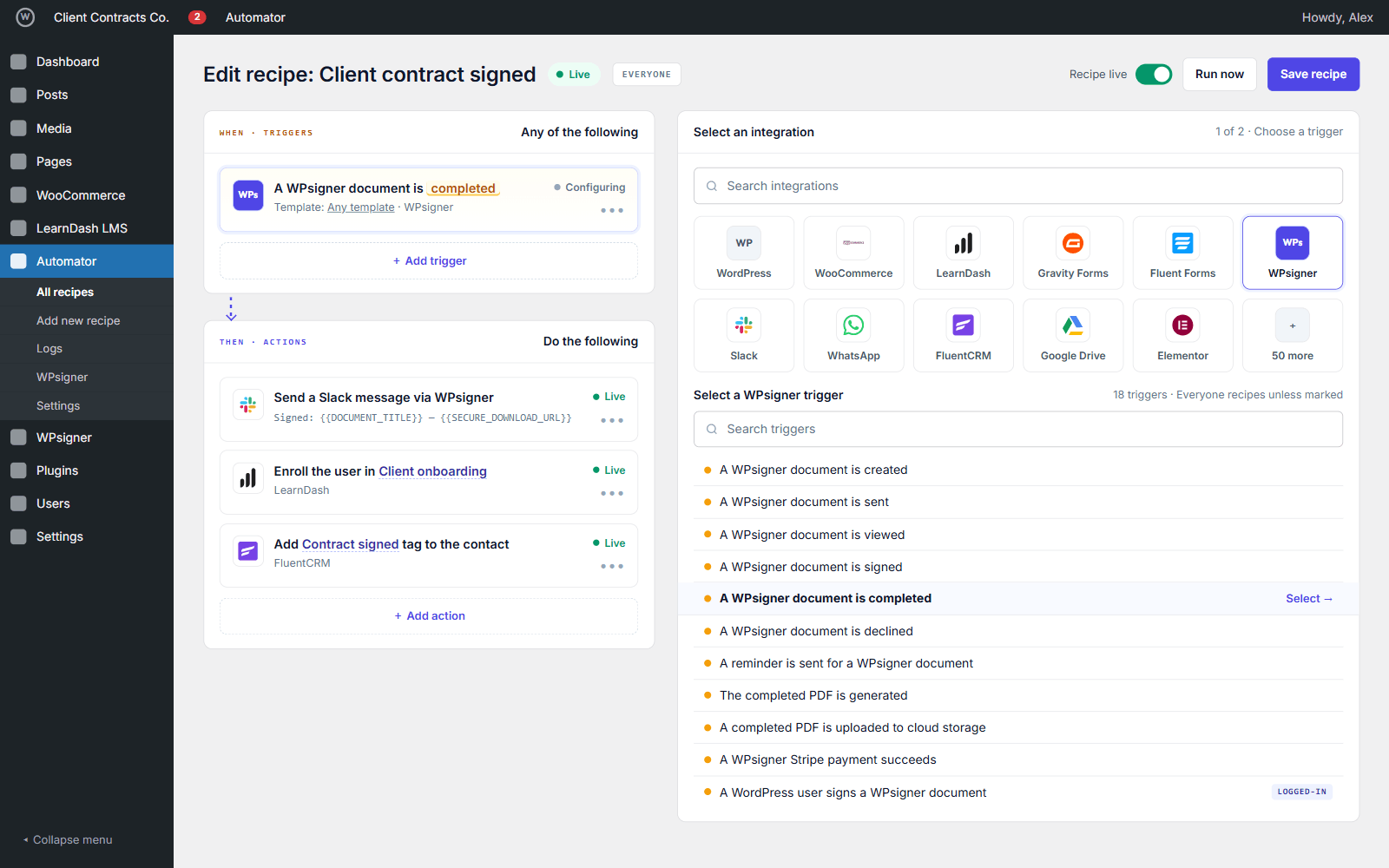
Pick WPsigner from the integrations list and these sentences show up. Every trigger can be limited to a specific template or left on Any template.

Triggers

Everyone recipes unless marked

  • A WPsigner document is created
  • A WPsigner document is sent
  • A WPsigner document is viewed
  • A WPsigner document is signed
  • A WPsigner document is completed
  • A WPsigner document is declined
  • A WPsigner document expires
  • A WPsigner document is cancelled
  • A reminder is sent for a WPsigner document
  • The completed PDF is generated
  • A completed PDF is uploaded to cloud storage
  • A WPsigner Stripe payment succeeds, fails, or is refunded
  • A WordPress user signs a WPsigner document Logged-in
All triggers and hooks

Actions

Run from any trigger, WPsigner or not

  • Create a WPsigner document from a template, with prefill
  • Send a WPsigner document
  • Send a WPsigner reminder
  • Send a reminder via WhatsApp, SMS, Slack, Telegram, or Teams
  • Send a Slack message via WPsigner
  • Add a signer to a WPsigner document
  • Add a tag to a WPsigner document
  • Set a WPsigner document expiration
  • Cancel a WPsigner document
  • Get WPsigner document signers
All actions and fields

Tokens

Pass values into later steps

  • Document ID
  • Document title
  • Document status
  • Template name
  • Secure download URL
  • Document audit URL
  • Certificate ID
  • Document tags
  • Owner email
  • All signer emails
  • Pending signers (JSON)
  • Signer name, email, status
  • Signing URL
  • FIELD_* values
  • Payment amount and currency
  • Cloud file URL
Example: message body of a Slack action
Signed: {{DOCUMENT_TITLE}} (ID {{DOCUMENT_ID}})
Signer: {{SIGNER_NAME}} <{{SIGNER_EMAIL}}>
PDF: {{SECURE_DOWNLOAD_URL}}
Audit: {{DOCUMENT_AUDIT_URL}}
All tokens

Automator Pro Adds conditions (document status, template, tag, WordPress user) and token loops over all or pending signers.

In wp-admin

What the recipe builder shows

The WPsigner integration inside Uncanny Automator: the trigger picker, the create action, and the token list.

Uncanny Automator recipe builder with the WPsigner integration selected and its trigger sentences listed
Trigger picker — WPsigner triggers listed in the recipe builder
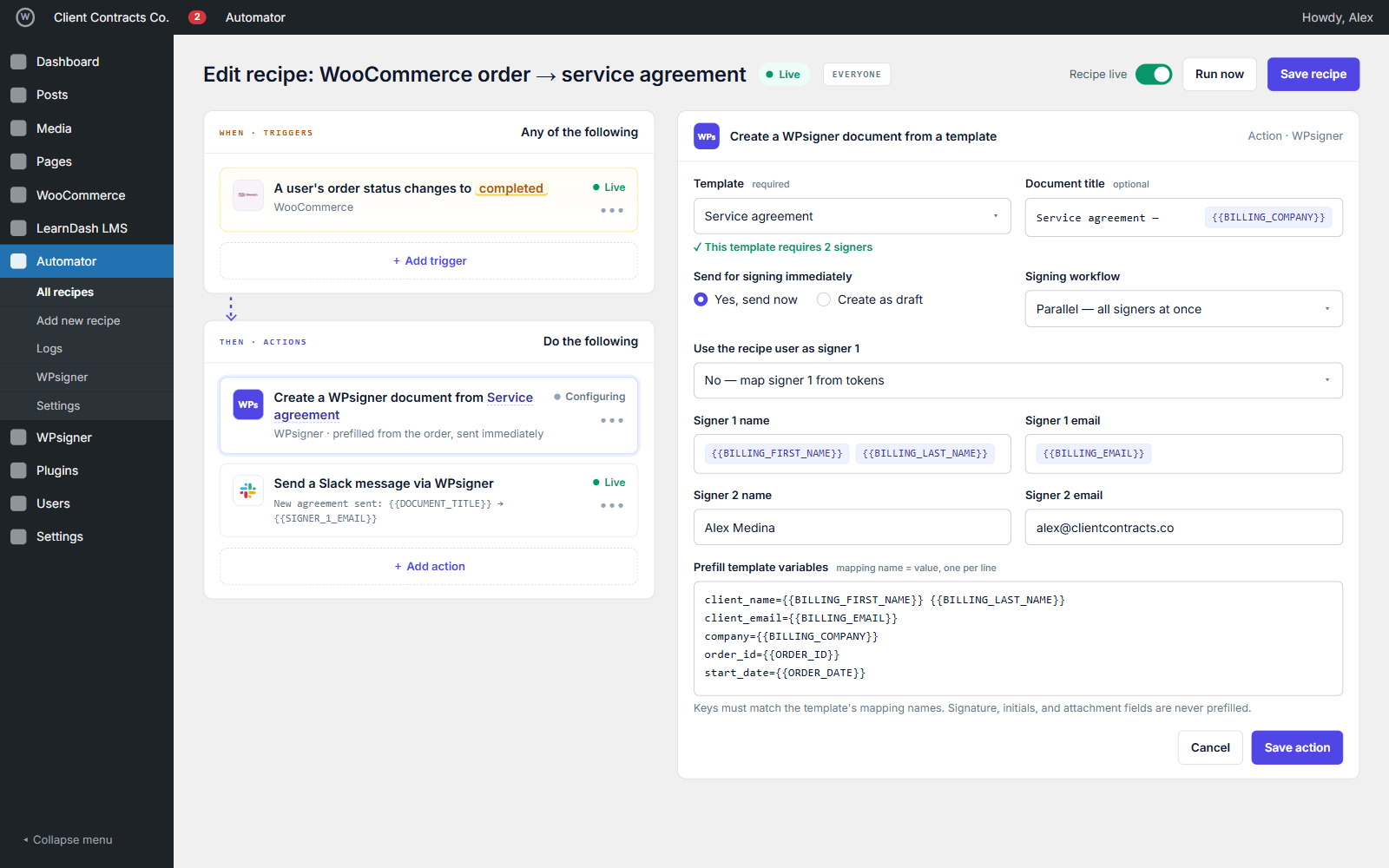
Create a WPsigner document from a template action showing template, signer, prefill, and send fields
Create action — template, signers, prefill from tokens, send immediately
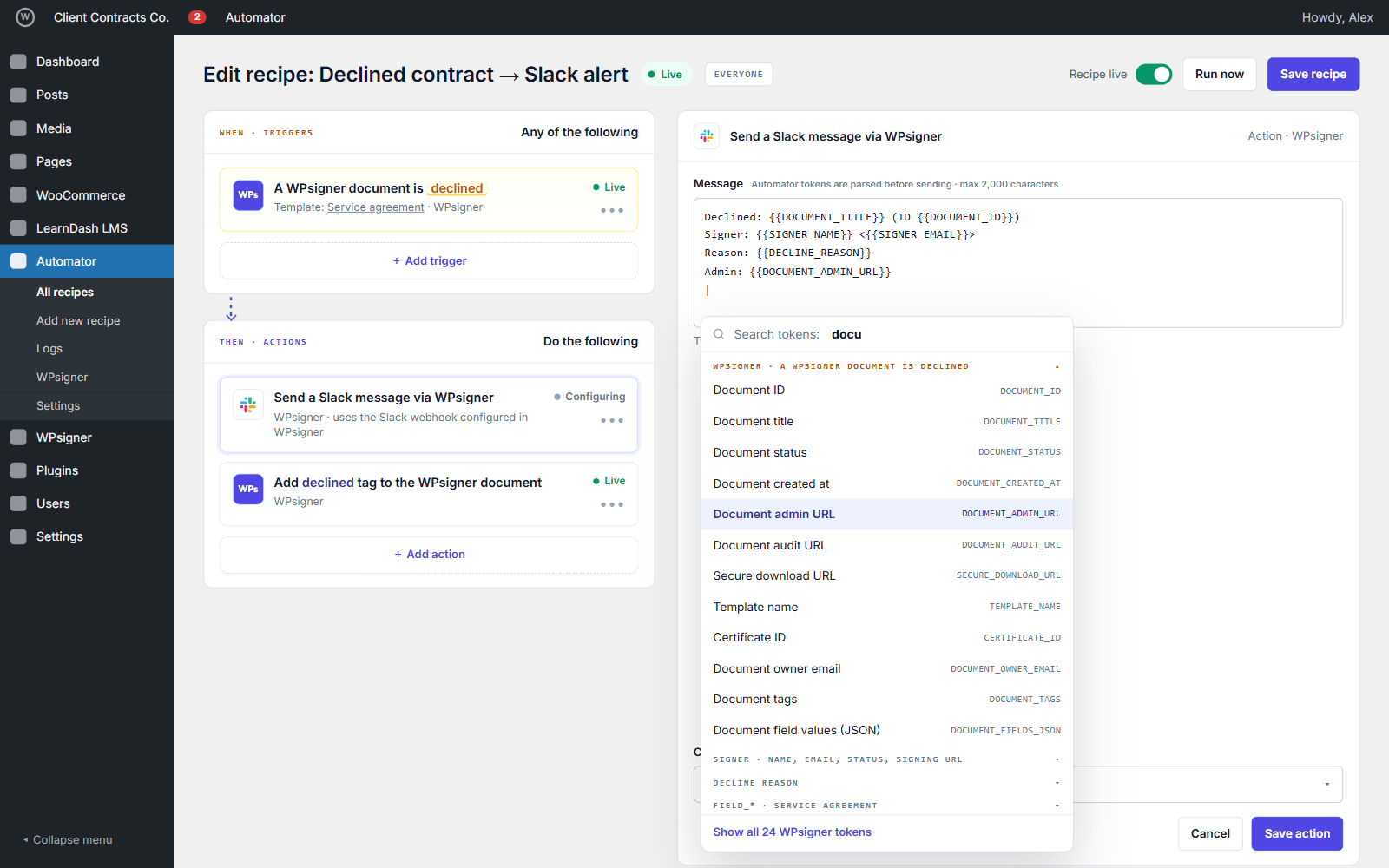
WPsigner token list inside Uncanny Automator with document, signer, payment, and cloud tokens
Tokens — document, signer, field, payment, and cloud values

Recipe examples

Six recipes you can build today

Each one is documented step by step. Use Everyone unless the recipe needs a logged-in user.

WooCommerce order → prefilled contract

When
An order is completed or paid
Then
Create a WPsigner document from a template, prefilled with billing data, and send it
Related feature

Contract completed → course or CRM

When
A WPsigner document is completed
Then
Enroll in LearnDash, tag the contact in FluentCRM, or change the user role
Related feature

Declined → Slack alert

When
A WPsigner document is declined
Then
Send a Slack message with the signer, the reason, and the admin URL
Related feature

Sent → WhatsApp reminder per signer

When
A document is sent, then wait two days
Then
Loop the pending signers and remind each one on WhatsApp
Related feature

Backup → notify with the cloud link

When
The completed PDF is uploaded to Drive, Dropbox, OneDrive, or S3
Then
Post the file URL to Slack, Teams, or email
Related feature

Form entry → branch → contract

When
A Gravity Forms, WPForms, or Fluent Forms entry arrives
Then
Wait, check a condition, then create the document from a template
Related feature

All recipe examples in the docs

Setup

Set up in five minutes

The addon appears as a WPsigner integration inside Uncanny Automator after you activate it.

  1. 1

    Install the three plugins

    Activate Uncanny Automator, WPsigner, and this addon on the same WordPress site.

  2. 2

    Download from the Account Portal

    Get WPsigner for Uncanny Automator under Account → Addons, then upload and activate the ZIP.

  3. 3

    Add a recipe

    Open Automator → Recipes. Use Everyone for guest signers. Add a WPsigner trigger, then any Automator or WPsigner action.

Requirements

  • WPsigner Lite or Pro on the same site
  • Uncanny Automator (free is enough for triggers and actions)
  • Uncanny Automator Pro only if you need WPsigner conditions or signer loops
  • WordPress 5.8+ and PHP 7.4+

Uncanny Automator free or Pro?

Triggers, actions, and tokens work with the free Automator plugin. Pro is needed only for WPsigner conditions and signer loops.

Feature Automator (free) Automator Pro
WPsigner triggers Yes Yes
WPsigner actions Yes Yes
Tokens Yes Yes
Conditions: status, template, tag, WordPress user No Yes
Token loops over signers No Yes

Addon or Zapier?

Local recipes or a cloud automation platform

WPsigner also connects to Zapier, Make, n8n, and Pabbly through webhooks and the REST API. Choose by where the other tools live.

Uncanny Automator addon Zapier, Make, n8n
Where it runs Your WordPress server Third-party cloud
Setup Install the addon, pick WPsigner in a recipe Webhook or API key, then map events
Best for WordPress plugins: WooCommerce, LearnDash, CRMs, user roles SaaS apps outside WordPress
Guest signers Everyone recipes Webhook events
Data path Stays on your site Event payloads leave your site

Questions

WPsigner for Uncanny Automator is an independent addon by WPsigner. It is not affiliated with, endorsed by, or sponsored by Uncanny Owl. “Uncanny Automator” is a trademark of its respective owner and is used only to describe compatibility. Gravity Forms and MainWP are trademarks of their respective owners.

Is this Zapier?

No. Recipes run on your WordPress site. Nothing is sent to Uncanny Owl or to a WPsigner cloud API for the recipe to work.

Do I need Uncanny Automator Pro?

Not for triggers and actions. Pro is required only for WPsigner conditions and signer token loops.

Can a guest signer start a recipe?

Yes. Signing triggers are built as Everyone (anonymous) recipes because most signers are not logged in.

Does it work with WooCommerce, Gravity Forms, or LearnDash?

Yes, through Automator: combine their triggers and actions with WPsigner's in one recipe. WPsigner also has native feeds for WooCommerce and form plugins; use Automator when you need delays, conditions, or another plugin in the same flow.

Where is the addon listed?

In the Uncanny Automator integrations directory as WPsigner, a third-party integration. WPsigner is also on the Gravity Forms Marketplace and in the MainWP Partner Add-ons.

Do signing URLs or field values show up in Automator logs?

Only if you insert those tokens. The addon settings let you hide signing URLs and field values from tokens and logs.

Which WPsigner version do I need?

WPsigner Lite or Pro. Filtering a trigger by template relies on WPsigner 3.x or later.

Where do I download it?

From the WPsigner Account Portal → Addons. You can also install it from WPsigner → Addons after the license sees the catalog.

Connect signing to the rest of WordPress

Download the addon, activate it next to Automator, and build the first recipe from a completed document.