Official Addon
Smart Signing Forms
Forms that become signed PDFs
Drag-and-drop signing forms for WordPress — with Stripe payments, OTP verification, and a full audit trail on every submission. No document wizard required.
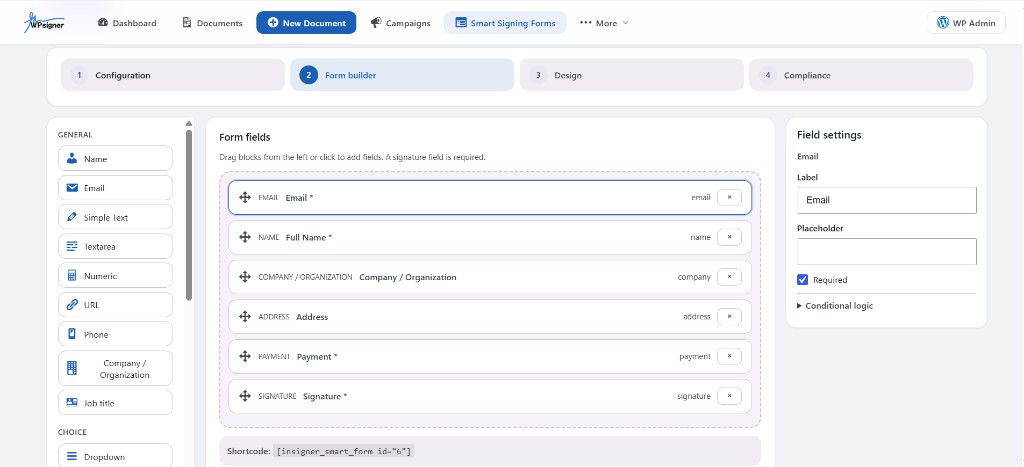
Drag fields, configure compliance, publish with [insigner_smart_form id="…"]
Built for form-first signing
When you need a signed PDF from a form — not a multi-step document workflow — Smart Signing Forms is the fastest path.
NDAs & waivers
Publish a short form, collect a signature, and get a signed PDF with audit trail — no document wizard.
Client onboarding
Intake forms that become legally auditable signed documents the moment they are submitted.
Consent forms
Medical, parental, or authorization consent with OTP, geolocation consent, and Certificate of Completion.
Paid agreements
Collect a Stripe payment before the signature — deposits, registration fees, or paid consultations.
Built in four steps
The form editor walks you from setup to compliance — then publishes with a single shortcode.
- 1
Configuration
Set the form title, PDF title, success message, and post-sign actions: email the PDF, show a download button, redirect, or display a verification link.
- 2
Form builder
Drag fields onto the canvas: text, email, phone, dropdowns, checkboxes, dates, file uploads, multi-column layouts, and conditional logic. Every form requires at least one signature field (draw, type, or upload).
- 3
Design
Choose from four presets — Professional, Modern, Minimal, Editorial — then tune density, labels, field styles, buttons, and brand colors with a live preview. No CSS required.
- 4
Compliance
Enable OTP identity verification, capture geolocation consent, add CC recipients, and apply trusted timestamps (TSA) from your WPsigner settings.

Collect payments before the signature
Add a Stripe payment field to charge a fixed amount — from $0.50 to $10,000 — before the signer submits. The flow is fill, pay with Stripe's Payment Element, sign, and submit.
- Payment verified server-side before the signed PDF is generated
- Each payment can only be used once
- Test mode is clearly badged so you can experiment safely

Verify identity with OTP
Need stronger identity assurance? Enable one-time password verification. The signer must verify the code before the form can be submitted, and the check is recorded in the audit trail.
- Email — works out of the box
- SMS — via your Twilio integration
- WhatsApp — via your WhatsApp Business integration
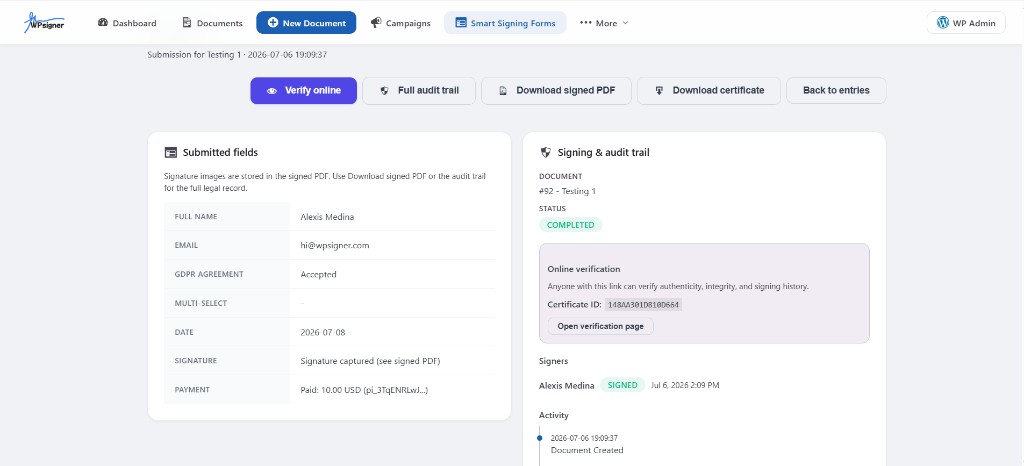
Every submission, fully auditable
Each entry gives you the submitted data, the signed PDF, a complete audit trail, and an online verification link so anyone can confirm authenticity.
- Verify online with a shareable Certificate ID
- Full audit trail with timestamps and signer evidence
- Download signed PDF and Certificate of Completion
Verify online
Share a Certificate ID so anyone can confirm integrity and signing history.
Full audit trail
Every action is logged in WPsigner with timestamps and signer evidence.
Signed PDF
Download the signed document generated automatically on submit.
Certificate of Completion
Export the legal summary alongside the signed PDF.
All available form fields
Drag any block from the field library onto the canvas. Every form requires at least one signature field.
General
- Name
- Simple text
- Textarea
- Numeric
- URL
- Phone
- Company / Organization
- Job title
- Address
Choice
- Dropdown
- Checkbox
- Multi-select
Advanced
- Date
- File upload
- Payment (Stripe)
- Signature (draw / type / upload)
- Conditional logic
- Multi-column layouts
Publish anywhere with a shortcode
After you publish the form in WPsigner → Smart Signing Forms, paste the shortcode into any page, post, or block that supports shortcodes.
[insigner_smart_form id="123"]How to get it
Available now for licensed WPsigner customers.
- 1
Log in to your Account Portal and open the Addons tab
- 2
Download the Smart Signing Forms ZIP
- 3
In WordPress, go to Plugins → Add New → Upload Plugin
- 4
Activate it from WPsigner → Addons
Requirements: WPsigner 3.0.0+, WordPress 5.8+, PHP 7.4+. Stripe payments require Stripe configured in WPsigner; SMS/WhatsApp OTP require the corresponding messaging integration.
Frequently asked questions
What is Smart Signing Forms?
Smart Signing Forms is the official WPsigner addon that lets you build drag-and-drop signing forms on WordPress. Every submission automatically creates a signed PDF with audit trail and Certificate of Completion — no document wizard required.
How do I install Smart Signing Forms?
Log in to your Account Portal at app.wpsigner.com, open the Addons tab, and download the ZIP. Then go to WordPress → Plugins → Add New → Upload Plugin, install the file, and activate it from WPsigner → Addons.
What are the requirements?
You need WPsigner 3.0.0 or newer, WordPress 5.8+, and PHP 7.4+. Stripe payments require Stripe configured in WPsigner. SMS or WhatsApp OTP require the corresponding messaging integration.
Can I collect payments on a signing form?
Yes. Add a Stripe payment field to any Smart Signing Form. The signer pays via Stripe's Payment Element, then signs and submits. Payment is verified server-side before the signed PDF is generated.
How do I publish a form on my site?
After publishing your form in WPsigner → Smart Signing Forms, copy the shortcode [insigner_smart_form id="123"] and paste it into any page, post, or block that supports shortcodes.
Start collecting signed forms today
Smart Signing Forms is included for licensed WPsigner customers. Download it from your Account Portal and publish your first form in minutes.
Stop paying per envelope
Choose an annual or lifetime license with unlimited documents and no per-envelope fees. Keep control of your data and signing workflows.