Managing five WordPress sites from separate dashboards is inconvenient. Managing 50 that way is an operational risk.
Updates, backups, security alerts, uptime incidents, client reports, renewals, and support work quickly become difficult to track across browser tabs and spreadsheets. A WordPress management platform creates one operating layer for that work—but the products in this category make very different tradeoffs.
Some are self-hosted. Others are SaaS. Some charge a flat fee, while others charge per site or per feature. A few focus on safe updates and recovery; others are broader agency platforms with billing, reporting, hosting, or security tools.
This guide compares seven of the strongest WordPress site management tools available to agencies in 2026:
- MainWP — best overall for self-hosted agency control
- Modular DS — best fixed-plan SaaS for structured care workflows
- WP Umbrella — best per-site SaaS for maintenance operations
- ManageWP — best free cloud starting point
- The Hub by WPMU DEV — best broad agency platform
- WP Remote — best for update safety and visual monitoring
- InfiniteWP — best established self-hosted alternative
Quick answer
MainWP is our top recommendation for agencies that want to own their management stack. It is open source, runs on a WordPress installation controlled by the agency, supports unlimited connected sites, and does not impose per-site management fees. Its extension model also makes it unusually adaptable.
That does not make it the universal winner:
- Choose Modular DS if you want a polished hosted dashboard, fixed site tiers, Update Copilot, backups, monitoring, and client reports in one subscription.
- Choose WP Umbrella if you prefer simple pay-as-you-go pricing and strong maintenance workflows.
- Choose ManageWP if you want to begin with a mature free cloud dashboard and add premium capabilities selectively.
- Choose WPMU DEV if you want management, plugins, hosting, domains, billing, and client tools from one vendor.
- Choose WP Remote if visual regression, update risk scoring, staging, and security are central to your service.
- Choose InfiniteWP if you want another self-hosted panel and are comfortable maintaining it.
Comparison table
| Tool | Hosting model | Pricing shape | Standout strength | Best for |
|---|---|---|---|---|
| MainWP | Self-hosted WordPress dashboard | Free core; flat Pro subscription | Ownership, unlimited sites, extensions | Agencies that want control and predictable scale |
| Modular DS | Hosted SaaS | Fixed tiers by site allowance | Update Copilot and care-plan operations | Agencies wanting an all-in-one SaaS |
| WP Umbrella | Hosted SaaS | From €1.99/site/month plus optional add-ons | Safe updates, backups, reports | Teams wanting straightforward per-site pricing |
| ManageWP | Hosted SaaS | Free core; per-site add-ons or bundles | Low-friction entry and modular features | Freelancers starting with a free dashboard |
| The Hub by WPMU DEV | Hosted SaaS/platform | Membership tiers and agency bundle | Broad integrated WordPress stack | Agencies consolidating several vendors |
| WP Remote | Hosted SaaS | Tiered plans by features and sites | Visual checks, security, staging | Teams prioritizing update safety |
| InfiniteWP | Self-hosted panel | Free base; paid annual tiers | Mature self-hosted feature set | Technical teams wanting a MainWP alternative |
Pricing and public features were reviewed on August 8, 2026. Vendors can change plans, limits, and promotional prices; verify the linked official pages before buying.
How we evaluated the tools
This ranking is based on public product documentation, pricing pages, feature descriptions, and suitability for recurring agency care work. We considered:
- Dashboard ownership and data control
- Bulk update management and update safety
- Backup frequency, retention, and restore workflow
- Uptime, performance, and vulnerability monitoring
- White-label reporting and client communication
- Team access and operational visibility
- Pricing at 10, 50, and 100-plus sites
- Integrations, APIs, and extensibility
We do not claim that every feature was independently stress-tested. Where a capability comes from a vendor, we link to that vendor’s official documentation.
WPsigner makes a commercial MainWP extension, so we have a direct interest in the MainWP ecosystem. We rank MainWP first because of its fit for self-hosted WordPress agencies and our hands-on knowledge of the integration. We also identify situations where another platform is the better choice.
1. MainWP — best overall for self-hosted agency control
MainWP takes a fundamentally different approach from cloud management services: the central dashboard is a WordPress installation that you control.
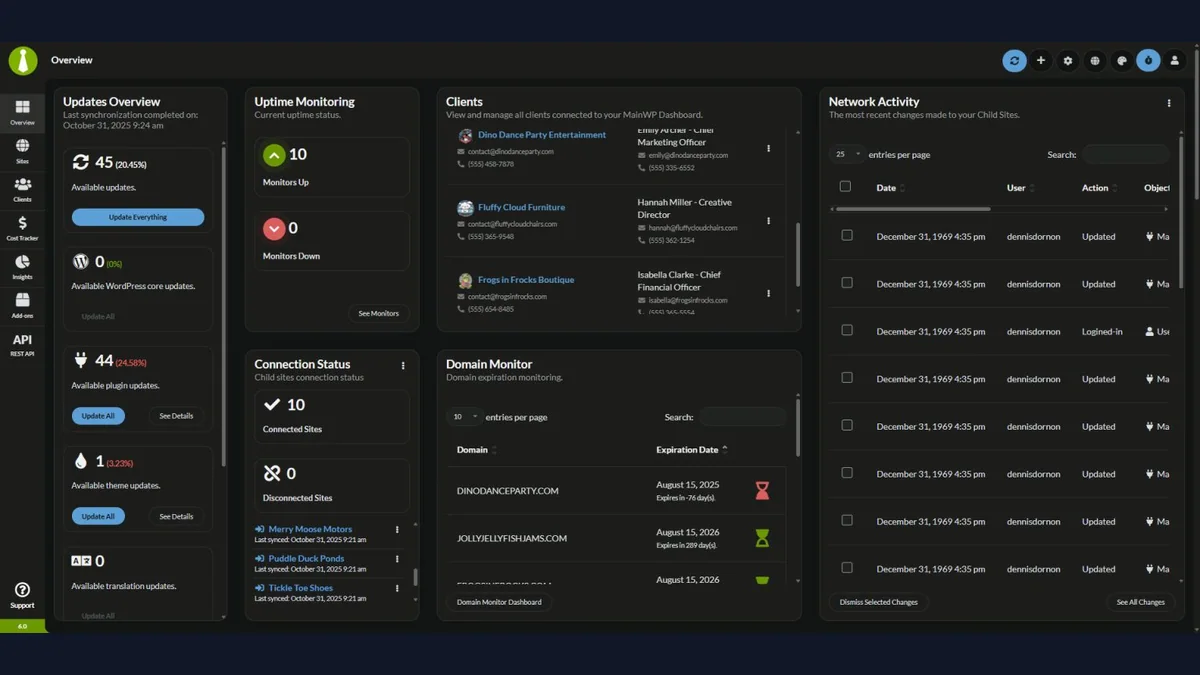
You install MainWP Dashboard on a dedicated WordPress site, then connect client sites with the MainWP Child plugin. The agency decides where the dashboard runs, who can access it, and how it is backed up.
Why MainWP ranks first
MainWP’s free core is open source and supports unlimited connected sites. According to its current free feature documentation, the dashboard covers tasks such as:
- One-click access to connected sites
- Bulk WordPress core, plugin, and theme updates
- Site organization with tags and notes
- Site health visibility
- Uptime monitoring and alerts
- Cost tracking
- Custom dashboard organization
- Free add-ons and developer extensibility
MainWP Pro adds more than 30 premium extensions, future Pro add-ons, and priority support. Public pricing reviewed for this article lists:
- $29/month
- $199/year
- $599 lifetime
Those prices cover unlimited managed websites. You still need to host, secure, update, and back up the MainWP Dashboard itself.
Where MainWP is strongest
Ownership: Site metadata and management workflows remain on infrastructure selected by the agency rather than inside a vendor-only dashboard.
Predictable scale: A flat Pro price can be attractive when a portfolio grows from 20 sites to 100 or more.
Extensibility: MainWP is closer to an agency operating system than a fixed maintenance application. Its REST API, hooks, extensions, and WordPress foundation support custom workflows.
Tool choice: Agencies can connect preferred backup, security, monitoring, and reporting services rather than adopting one mandatory stack.
The tradeoffs
- Your team is responsible for the MainWP Dashboard’s hosting and security.
- The experience can involve more configuration than an all-in-one SaaS.
- Some advanced workflows require Pro extensions or third-party services.
- A self-hosted dashboard reduces vendor dependency, but it does not eliminate the need for tested backups and access controls.
WPsigner for MainWP: contracts inside the agency dashboard
Site maintenance is only part of an agency relationship. New clients also require NDAs, maintenance agreements, statements of work, approvals, and renewals.
The WPsigner for MainWP integration adds that document layer to the MainWP Dashboard:
- Install WPsigner Pro and the WPsigner for MainWP extension on the MainWP Dashboard site.
- Associate a document with a MainWP Client and Site.
- Create contracts from WPsigner templates.
- Prefill signer information from the client record.
- Send documents and reminders from MainWP views.
- Filter documents by client, site, and signing status.
- Keep the signing installation on the agency Dashboard—no WPsigner installation is required on every child site for this workflow.
MainWP remains the site management platform; WPsigner supplies the contract and electronic-signature workflow. This makes the combination particularly relevant to agencies selling recurring care plans.
The extension is now listed as a free Partner Add-on on MainWP.com. Details and setup: WPsigner is now available for MainWP.
Best fit: Agencies that value self-hosting, fixed costs, extensibility, and a dashboard they control.
2. Modular DS — best fixed-plan SaaS for structured care workflows
Modular DS is a hosted WordPress management platform built around the daily work of freelancers and maintenance agencies.
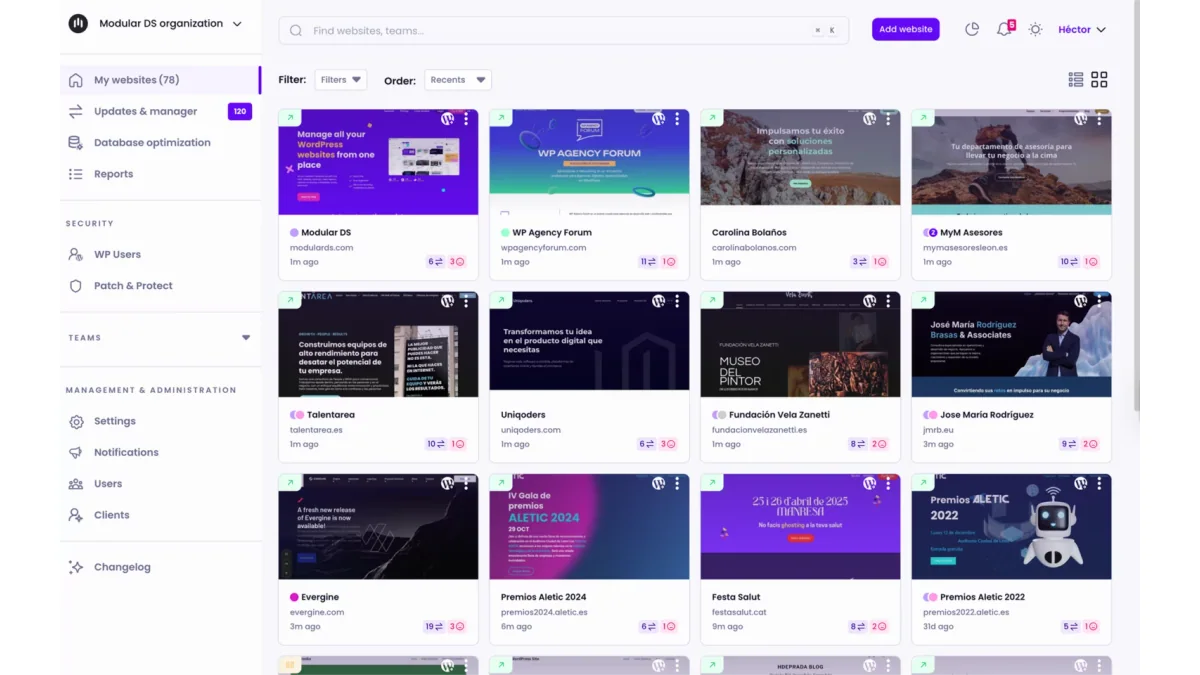
Its current feature set includes:
- Bulk core, plugin, and theme management
- Automatic backups and restores
- Uptime, SSL, keyword, and performance monitoring
- Vulnerability detection through Patchstack
- Database optimization
- White-label client reports
- Google Analytics, Search Console, WooCommerce, and PageSpeed data
- One-click login
- Notifications through channels including email and WhatsApp
One of its clearest differentiators is Update Copilot, which uses risk information to help teams judge updates and supports safer update workflows and rollback.
Pricing model
The Modular DS pricing page reviewed on August 8, 2026 listed fixed monthly tiers:
- Freelance: $16/month for 10 websites
- Starter: $34/month for 35 websites
- Business: $59/month for 75 websites
- Enterprise: $96/month for 125 websites
Site, user, and storage overages can be billed beyond a plan’s included limits. Backup frequency, storage, monitoring intervals, and team seats vary by tier.
Where Modular DS is strongest
- Clean SaaS onboarding with no central dashboard to host
- A cohesive maintenance workflow rather than a collection of unrelated add-ons
- Fixed site bands that are easier to forecast than per-feature billing
- Strong reporting integrations for demonstrating care-plan value
- Useful communication channels for international agencies
The tradeoffs
- The dashboard and operational data live in a hosted service.
- Costs rise as the portfolio crosses plan limits.
- Teams should compare storage, backup frequency, users, and overage—not only the headline site allowance.
- It is less open-ended than a self-hosted platform such as MainWP.
Best fit: Agencies that want a modern all-in-one SaaS and prefer fixed plan tiers over building their own stack.
3. WP Umbrella — best per-site SaaS for maintenance operations
WP Umbrella focuses tightly on WordPress care operations: updates, backups, monitoring, security visibility, automation, and client reporting.
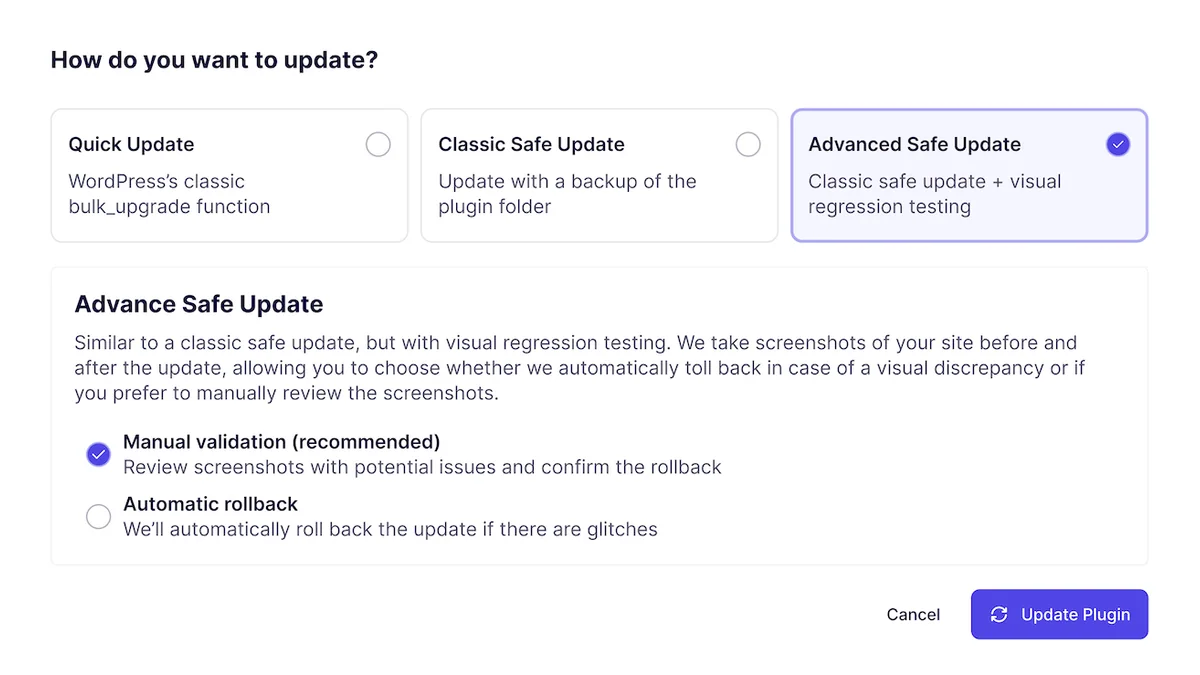
Its feature documentation emphasizes:
- Update workflows with visual regression checks
- Pre-update backups and automatic rollback when an update fails
- Cache clearing and database update verification
- Full and selective backup restoration
- Uptime, performance, PHP error, SSL, and domain monitoring
- Automated white-label reports
- Activity history and team visibility
Pricing model
WP Umbrella’s published pricing starts at €1.99 per site per month with no site minimum. Most standard features are included.
Two optional add-ons were listed when this article was reviewed:
- Security: €2 per site/month
- Hourly backups: €2.49 per site/month
That model is easy to understand, but the total grows directly with the portfolio. At 50 sites, the base platform alone is approximately €1,194 per year, before optional add-ons.
Where WP Umbrella is strongest
- Clear pay-as-you-go pricing
- Strong safe-update and recovery narrative
- No central dashboard infrastructure for the agency to maintain
- Reporting designed around recurring client care
- The ability to enable additional protection only where needed
The tradeoffs
- Per-site costs compound as portfolios grow.
- Security and hourly backups cost extra.
- The agency depends on a hosted operational layer.
- A simple base rate can still become substantial at 100 or 300 sites.
Best fit: Agencies that want focused maintenance tooling, reliable reporting, and per-site billing they can pass into client care plans.
4. ManageWP — best free cloud starting point
ManageWP remains one of the most recognizable multi-site WordPress dashboards.
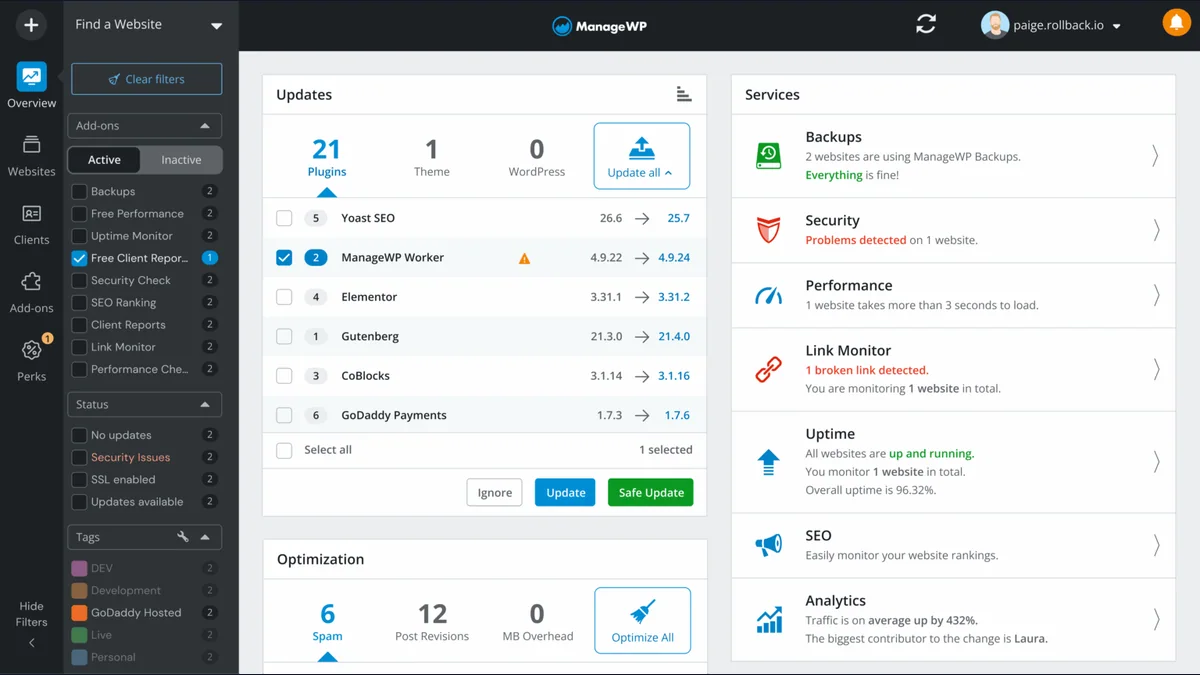
Its free tier supports unlimited sites and includes core management capabilities, monthly cloud backups, vulnerability detection, one-click access, updates, and other everyday tasks.
Premium functions are purchased per site and per add-on. ManageWP also offers bundles that cover an add-on across up to 100 websites, which can improve the economics for larger portfolios.
Relevant premium capabilities include:
- More frequent incremental backups
- On-demand backups, cloning, and migration
- Uptime monitoring
- Safe Updates
- Security and performance checks
- SEO rank tracking
- Advanced client reports
- White labeling
- Link monitoring
- Vulnerability protection
See the official ManageWP pricing page because the final cost depends on which features are activated on which sites.
Where ManageWP is strongest
- A genuinely useful free entry point
- No central management server to maintain
- Activate premium features only on sites that need them
- A mature workflow familiar to many freelancers
- Bundles for common features across larger portfolios
The tradeoffs
- Per-site, per-feature billing requires careful cost modeling.
- A portfolio where every site needs premium backups, uptime, reports, and white labeling can cost much more than the free headline suggests.
- The platform is hosted, so it offers less infrastructure ownership than MainWP or InfiniteWP.
- Agencies should inspect current product development and feature fit rather than choosing solely on brand familiarity.
Best fit: Freelancers and small agencies that want a cloud dashboard immediately and need premium tools on only part of their portfolio.
5. The Hub by WPMU DEV — best broad agency platform
The Hub by WPMU DEV combines site management with a wider ecosystem of WordPress services.
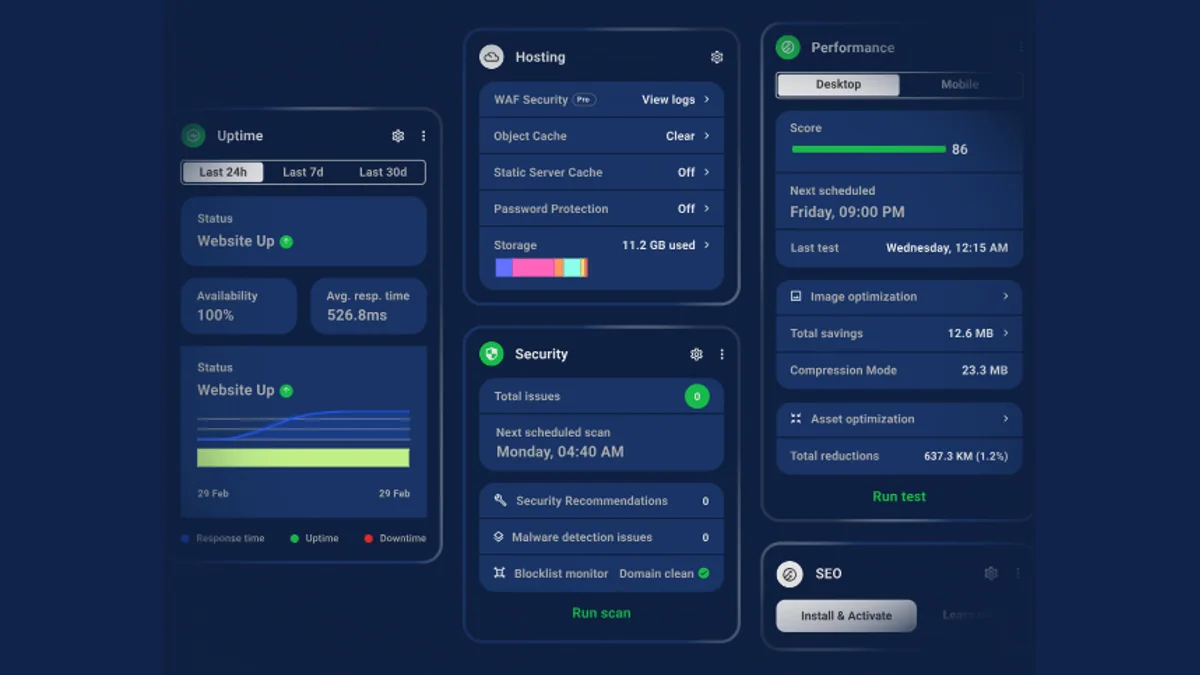
Depending on the membership, the platform can bring together:
- Automated core, plugin, and theme updates
- One-click site access
- Off-site backups
- Uptime monitoring
- Security, performance, SEO, and broken-link tools
- White-label client reports
- Team and client roles
- Analytics and activity logs
- Domains, hosting, email, billing, and reseller tools
- A suite of WPMU DEV Pro plugins
Where The Hub is strongest
- It can replace several separate agency subscriptions.
- Client management and billing go beyond routine WordPress updates.
- Teams get access to a broader support and plugin ecosystem.
- Sites can be hosted anywhere, while WPMU DEV hosting and domains remain available.
The tradeoffs
- The product is most compelling when an agency adopts more of the WPMU DEV ecosystem.
- Pricing and promotional offers change, so compare renewal cost rather than only an introductory deal.
- Agencies already satisfied with their hosting, plugins, security, and billing may find the platform broader than necessary.
- It is a hosted vendor platform rather than a self-hosted management dashboard.
Best fit: Agencies that want to consolidate management, plugins, hosting-related services, reporting, and client operations with one vendor.
6. WP Remote — best for update safety and visual monitoring
WP Remote positions site management around safer operational workflows rather than bulk updates alone.

Its current plans highlight features such as:
- Central plugin and theme management
- Automatic and scheduled updates
- Update Lens risk scoring
- Visual regression snapshots
- Staging and sandbox updates
- Automated backups with varying retention
- Malware scanning, firewall, and virtual patching
- Uptime and domain monitoring
- White-label reports
- Slack integration
This is particularly relevant for WooCommerce, membership, booking, and lead-generation sites where an update can technically succeed while visually breaking a critical page.
Where WP Remote is strongest
- Update risk and visual change detection receive first-class attention.
- Higher plans combine security, staging, backup, and reporting.
- It helps agencies create a more defensible update process for higher-value sites.
The tradeoffs
- Tiered pricing and limits require a site-by-site comparison.
- The complete security and staging workflow costs more than basic management.
- Small brochure sites may not need the full operational depth.
- It is a hosted service.
See WP Remote pricing for current site allowances, backup retention, scan frequency, and visual-monitoring limits.
Best fit: Agencies managing revenue-critical sites where update validation and recovery matter more than finding the cheapest bulk updater.
7. InfiniteWP — best established self-hosted alternative
InfiniteWP is an established self-hosted panel for managing multiple WordPress sites.
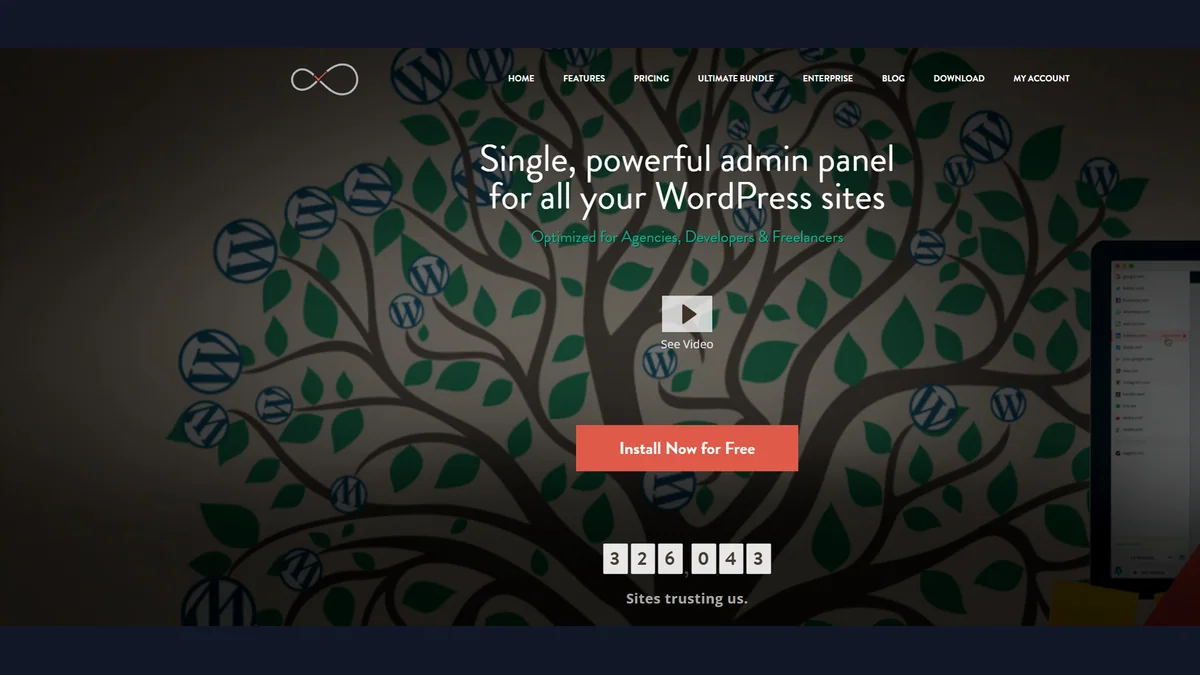
The free base includes one-click administration, updates, and backup/restore. Paid plans add capabilities such as:
- Scheduled and cloud backups
- Vulnerability updates
- Staging and migration
- Malware scanning
- Uptime monitoring
- Client reporting
- Plugin branding
- User and team management
- Analytics, PageSpeed, and maintenance tools
Its features page separates free capabilities from those included in premium plans. Public pricing reviewed for this article started at $147/year for 10 sites, with higher limits and enterprise options for larger teams.
Where InfiniteWP is strongest
- Self-hosted dashboard control
- A long-established catalog of maintenance add-ons
- Free fundamentals for technical users
- Premium options for staging, security, reports, and teams
The tradeoffs
- The agency must maintain and secure the panel.
- The interface and product packaging can feel less unified than newer SaaS competitors.
- Premium pricing depends on site limits.
- Compare its release activity, documentation, and support experience with MainWP before committing.
Best fit: Technical teams that specifically want a self-hosted alternative and prefer InfiniteWP’s add-on set or established workflow.
MainWP vs Modular DS vs WP Umbrella vs ManageWP
These four tools illustrate the major choices in this market.
Choose MainWP when:
- You want the management dashboard on infrastructure you control.
- Your site count is growing and per-site fees are unattractive.
- You need an API, extensions, or custom agency workflows.
- You want to combine site management with the WPsigner MainWP contract workflow.
Choose Modular DS when:
- You want SaaS convenience with fixed site tiers.
- Update Copilot, integrated reports, and communication channels fit your team.
- You prefer one bundled maintenance platform.
Choose WP Umbrella when:
- You want simple per-site pricing.
- Safe updates, backups, monitoring, and white-label reports are the priority.
- You want no management dashboard infrastructure to maintain.
Choose ManageWP when:
- You need a free cloud dashboard now.
- Different client sites need different premium add-ons.
- Your portfolio can benefit from feature bundles.
Self-hosted vs SaaS management: the decision that matters most
Feature lists change quickly. Hosting model changes more slowly.
A self-hosted manager gives you:
- Control over the central dashboard and its data
- Greater freedom to integrate custom systems
- Potentially flatter costs at high site counts
- Responsibility for dashboard hosting, backups, updates, and security
A SaaS manager gives you:
- Faster onboarding
- No central server to maintain
- Vendor-managed dashboard availability and updates
- Recurring platform dependency and pricing tied to sites, tiers, or features
Neither model is automatically more secure. A neglected self-hosted dashboard can be a risk; a well-operated one can offer strong control. A SaaS service can reduce maintenance burden; it also introduces a processor and an external operational dependency.
What agencies should verify before choosing
Do not select a platform from a homepage feature grid alone. Test these workflows during a trial:
- Connect a real staging site.
- Run a plugin update and inspect the failure path.
- Create a backup and complete a test restore.
- Trigger an uptime alert.
- Generate the exact client report you intend to send.
- Invite a team member with restricted permissions.
- Calculate annual cost at your expected portfolio size—not today’s size.
- Review data location, subprocessors, retention, and export options.
- Check how the platform records activity and supports incident investigation.
- Confirm what happens if you cancel.
For agencies selling care plans, also map the commercial workflow around the tool: proposal, service agreement, onboarding, recurring reporting, renewal, and offboarding. A maintenance dashboard manages sites; it does not automatically manage client consent or signed contracts.
Final verdict
MainWP is the best overall fit for self-hosted WordPress agencies in 2026. Its free core, unlimited-site architecture, flat Pro pricing, and extension model make it unusually strong for agencies that want to own their operational stack.
The WPsigner for MainWP extension strengthens that agency use case by bringing NDAs, maintenance agreements, SOWs, and signature tracking into the same Dashboard context as Clients and Sites.
For agencies that do not want to maintain a central WordPress dashboard, Modular DS and WP Umbrella are the strongest all-in-one SaaS choices in this comparison. ManageWP remains the easiest free cloud entry point. WPMU DEV, WP Remote, and InfiniteWP each make sense for more specific operational priorities.
The right tool is the one that protects your update and recovery process, makes client work visible, and still fits your margins when the portfolio doubles.
Sources and research notes
Primary product information and public pricing were reviewed on August 8, 2026. The WPsigner Partner Add-on listing was confirmed on September 3, 2026:
- MainWP official website, free features, pricing, and WPsigner for MainWP add-on
- Modular DS features, FAQ, and pricing
- WP Umbrella features and pricing
- ManageWP pricing, backup, and vulnerability protection
- WPMU DEV site management and pricing
- WP Remote pricing
- InfiniteWP features and pricing
Product names and trademarks belong to their respective owners. This article is an editorial comparison, not legal, security, or purchasing advice.