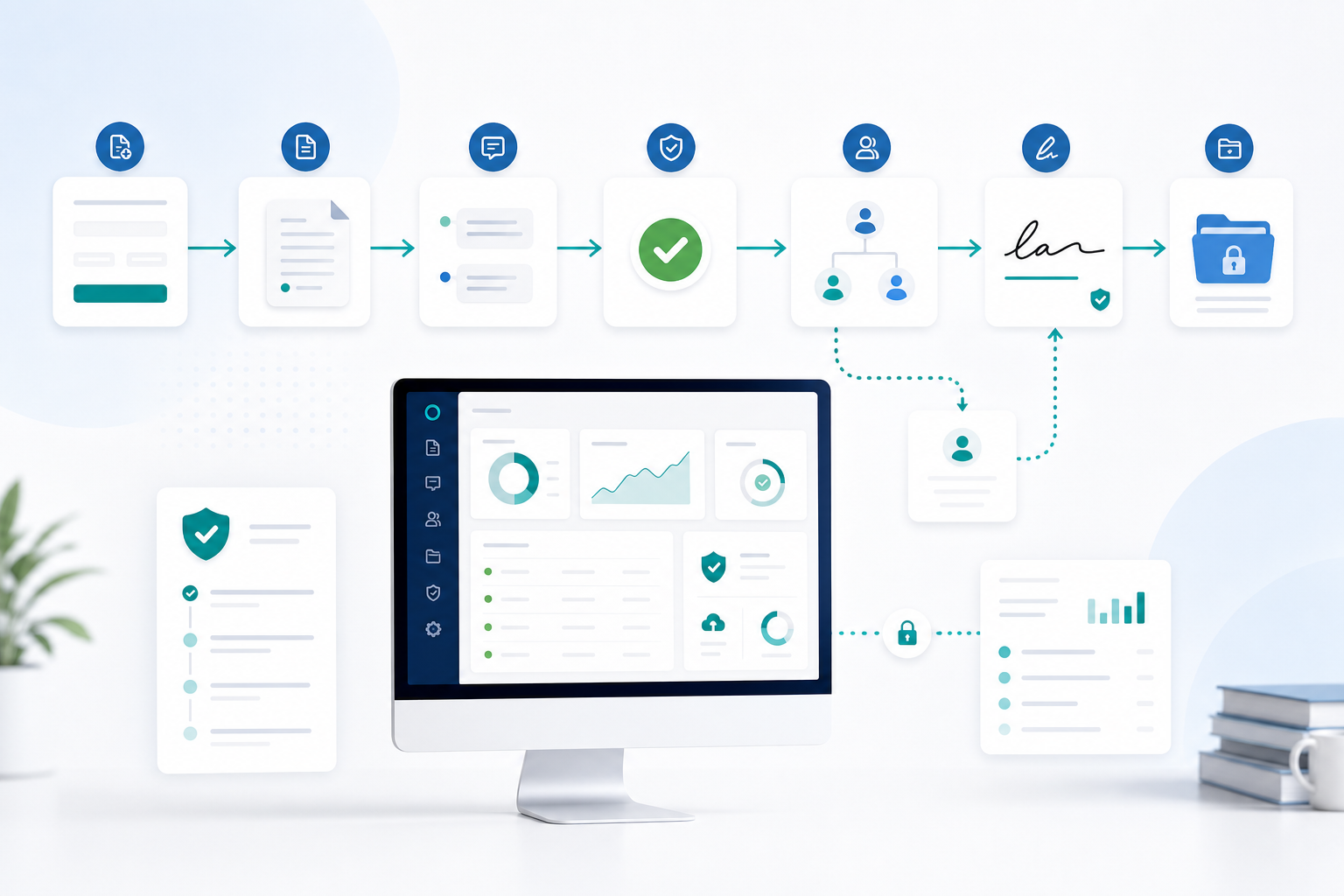
A contract approval workflow is the controlled path an agreement follows from the first business request to its final signed archive. It defines who prepares the contract, who reviews risk, who may approve it, who signs it, and what evidence must be retained. The practical goal is not simply to collect a signature faster. It is to prevent unauthorized, outdated, or incomplete agreements from reaching a signer.
For a WordPress-based business, the workflow can live close to the forms, orders, member records, or client portal that already initiate the transaction. Contract workflow automation then handles repeatable routing, notifications, status changes, and records while people keep responsibility for commercial and legal decisions.
The seven-step contract approval workflow
Use this textual map as the baseline:
Request → Draft → Internal review → Approval → Signer routing → Execution → Archive
Each arrow is a gate, not just a handoff. Define the input, owner, completion condition, and exception for every gate before choosing software.
1. Request: capture complete business requirements
Start with a structured request rather than an email saying “please send the usual contract.” Capture the counterparty, agreement type, value, term, renewal, governing region, requested start date, data access, unusual commitments, and internal budget owner.
2. Draft: choose the controlled source
Create the draft from an approved template whenever the transaction fits a standard pattern. Record the template version and distinguish editable business fields from protected legal language. If the source arrives as a Word file, first normalize the document and preserve a clean master; this guide to signing a Word document explains the practical file options.
3. Internal review: examine content by risk
Review should be proportional. Sales may confirm scope and price, finance checks payment and liability exposure, security reviews data access, and legal handles non-standard terms. Do not send every low-risk renewal through the same committee as a strategic agreement.
A useful rule is to route by attributes: contract type, value threshold, data sensitivity, jurisdiction, term length, or deviation from the template. Reviewers should either accept, request a specific revision, or escalate. Vague comments such as “looks risky” do not create an actionable record.
4. Approval: confirm authority before external routing
Approval means an authorized person confirms that the reviewed version may proceed. It is not automatically a signature. Define an approval matrix, such as department head up to one value, finance director above it, and executive approval for exceptional liability or multi-year commitments.
The approved file should be locked as the version for execution. If material terms change afterward, the workflow must return to the relevant review and approval gate. This prevents a negotiated revision from bypassing the decision that originally authorized the agreement.
5. Signer routing: send to the right people in the right order
Validate each signer’s name, email, role, and authority. Decide whether they act one after another, at the same time, or in a hybrid sequence. A secure invitation should identify the document and provide a unique route to the signing session without exposing the agreement publicly.
WPsigner’s smart workflows support approver and signer roles, conditions, deadlines, and sequential, parallel, or hybrid routing inside WordPress. Keep the route as simple as the control requirements allow; complexity is useful only when it represents a real dependency.
6. Execution: collect intent, fields, and signatures
During execution, each party reviews the final document, completes assigned fields, expresses consent, and signs. The system should show progress, send measured reminders, and stop or escalate when a person declines or a deadline expires.
A signature image alone is weak process evidence. Preserve the signed version together with event timestamps, signer attribution signals, and an integrity fingerprint. WPsigner’s audit trail records workflow events and document hashes designed to support that evidence. Whether a signature is legally effective still depends on context, consent, attribution, integrity, authority, and applicable law.
7. Archive: retain a complete, usable record
Archive the final signed PDF, completion record, relevant approvals, template version, dates, owner, and retention classification. Restrict access by role and make retrieval predictable. “It is somewhere in an inbox” is not an archive.
Define what happens at expiration, renewal, termination, legal hold, and the end of the retention period. Backups and export procedures matter too: a self-hosted workflow gives the organization control, but the organization must operate that control responsibly.
Sequential vs. parallel approval and signing
Sequential routing activates one person or group only after the prior step finishes. Choose it when:
- a manager must approve before legal reviews;
- a customer signs before an authorized countersigner;
- a witness or final executive depends on an earlier action;
- confidential information should not reach later participants yet.
The advantage is control and clear dependency. The cost is waiting: one inactive participant blocks everyone behind them.
Parallel routing activates independent reviewers or signers together. Choose it when finance and security can review different risks at the same time, or when several parties may sign in any order. It shortens elapsed time but requires a rule for conflicting feedback and a clear “all required” or “minimum required” completion condition.
Hybrid routing is often best: finance and legal review in parallel, a manager approves after both finish, two customer representatives sign in parallel, then the company countersigns last. See the detailed sequential signing guide for order, reminders, deadlines, and mixed stages.
How to automate the workflow in WordPress with WPsigner
Begin with the process, then configure the tool. WPsigner is a self-hosted WordPress contract plugin that can support document templates, internal approval roles, conditional routing, sequential and parallel signing, reminders, status tracking, signed PDFs, and audit records. It does not replace legal judgment, authority checks, or records governance.
A practical setup is:
- Define roles and permissions. Separate requester, editor, reviewer, approver, sender, signer, and archive administrator where risk warrants it.
- Prepare controlled templates. Mark required fields, signer fields, dates, initials, and checkboxes; give every template an owner and review date.
- Translate the approval matrix into rules. For example, route non-standard terms to legal or values above a threshold to finance leadership.
- Choose the route. Configure sequential, parallel, or hybrid stages and specify what rejection, expiration, or reassignment should do.
- Set communications. Write recognizable invitations and reasonable reminders. Include an internal escalation path rather than repeatedly emailing a stalled signer.
- Test with a non-production contract. Exercise approval, rejection, expiration, incorrect email, changed document, and completed archive scenarios.
- Review the evidence package. Confirm that the executed PDF and audit information can be retrieved by authorized staff.
Because WPsigner runs in WordPress, documents and workflow records normally remain in the environment you control. That also means your team owns WordPress hardening, HTTPS, access management, updates, backups, retention, and incident procedures. Check the current plan matrix on the pricing page or start from the WPsigner home page.
Contract workflow implementation checklist
- Every request has a business owner and required metadata.
- Approved templates have version numbers, owners, and review dates.
- Non-standard clauses trigger the correct specialist review.
- Approval limits match the organization’s authority policy.
- Material edits after approval force re-review.
- Approver and signer are separate roles where needed.
- Signer identity, email, role, and authority are verified.
- Sequential dependencies are necessary and documented.
- Parallel stages have an explicit completion rule.
- Rejection, expiry, reassignment, and absence paths are tested.
- Invitations, reminders, and escalations have owners and timing.
- Signed files and audit records use restricted, backed-up storage.
- Retention, renewal, deletion, and legal-hold rules are documented.
KPIs that show whether automation works
Measure outcomes by contract type and risk tier, not only across one blended average:
- Request-to-draft time: how long it takes to produce a reviewable version.
- Review time: elapsed time in legal, finance, security, or management review.
- Approval cycle time: submission to final internal authorization.
- Signature turnaround: first external invitation to completion.
- First-pass approval rate: percentage approved without revision.
- Touch count: manual handoffs, emails, and status checks per contract.
- Exception rate: percentage leaving the standard template or route.
- Stall rate: workflows inactive beyond the expected service level.
- Completion rate: initiated agreements that reach execution.
- Retrieval time: time required to find the signed agreement and evidence.
Common workflow mistakes
Automating a vague process. Software makes ambiguity travel faster. Agree on ownership, authority, and exceptions first.
Treating approval as a signature. Internal authorization and contractual assent are different events and may involve different people.
Routing everything sequentially. Unnecessary dependencies create queues. Parallelize truly independent reviews.
Letting edits bypass re-approval. Lock the execution version and restart affected gates after a material change.
Overusing reminders. Frequent generic emails train recipients to ignore the system. Escalate based on risk and deadline.
Ignoring the archive. A fast signature process that produces scattered records creates future operational and evidentiary problems.
Making absolute legal claims. A workflow can support consent, attribution, and integrity evidence; it cannot guarantee that every document or signature is valid in every jurisdiction.
Example: a $25,000 agency services agreement
An account manager submits the request with scope, customer entity, $25,000 value, twelve-month term, and a requested start date. The system selects the approved services template and fills the commercial fields.
Because the customer proposes a data-processing addendum, legal and security review in parallel. Both request narrow revisions, the owner resolves them in one controlled draft, and each reviewer marks the new version complete. The amount exceeds the department head’s limit, so finance approval follows.
After approval, the customer’s operations lead and procurement manager sign in parallel. Only when both complete does the agency director receive the countersignature request. The executed PDF and audit record are archived with the customer record, renewal date, template version, and retention category.
Frequently asked questions
What is a contract approval workflow?
It is the defined sequence for requesting, drafting, reviewing, approving, routing, executing, and archiving a contract, with named owners and completion rules at each stage.
What is the difference between approval and signing?
Approval is an internal authorization to proceed. Signing records a party’s intent to agree. One person may approve risk while another has authority to sign.
Should signing be sequential or parallel?
Use sequential signing for real dependencies and parallel signing for independent participants. Use a hybrid route when some stages can overlap but final authorization must wait.
Can WordPress automate contract approvals?
Yes. With an appropriate plugin and a defined process, WordPress can coordinate templates, approval roles, routing, reminders, status, signed files, and audit records.
Does automation guarantee legal validity?
No. It improves consistency and evidence, but the result depends on the transaction, law, document type, consent, intent, attribution, signer authority, and integrity controls.
Build control into the route
An effective contract approval workflow makes the safe path the easy path. Define the seven gates, remove unnecessary waiting, automate repeatable coordination, and preserve a complete record. WordPress and WPsigner can provide the routing and evidence layer; accountable people must still own the decisions.